Paint By Number Creator2.0.11 - App Store
You'll be able to see results in few seconds.
Publisher Description
Your favorite photo deserves more than a gallery scroll. Paint By Number Creator transforms it into a classic numbered painting you can enjoy yourself, share with family, or print as a handmade gift.
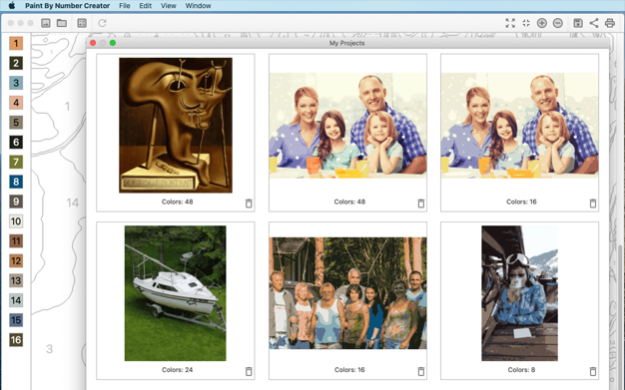
Open a picture, choose how detailed you want the palette, and watch regions and numbers appear. Prefer speed? Use Rough. Want finer shapes? Switch to Precise. Then paint digitally-fill everything at once or one area at a time-or export a crisp PDF with a color key for real paints and paper.
Why people love it
. Bring memories, pets, and portraits to life as numbered art
. Dial in 2-64 colors and A4, A3, or A2 paper for the look you want
. Rough for a quick result, Precise when every contour counts
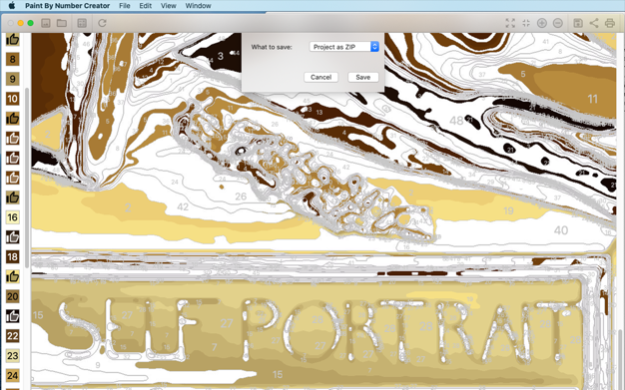
. Flip between original, filled colors, and numbered outlines
. Playful fill modes: complete the whole picture or tap area by area
. Match paints with RAL, RGB, HEX, or Pantone FHI labels
. Export PDF with color key, print, or save JPEG views
. Keep projects in your library and pick up anytime
From rainy-day coloring to classroom crafts and thoughtful keepsakes, Paint By Number Creator makes creating feel easy-and finishing feel wonderful.
Version History Fixed a bug that caused numbers to be missing from the image on some devices. 2.0.11 2d ago Stability enhancement 2.0.10 Sep 7 Fixed precise algorithm crash on some images. 2.0.8 Sep 2 Fixed error with Details parameter for precise algorithm 2.0.7 Aug 31 New Precise conversion for sharper numbered regions
Crop, rotate, and fine-tune the photo before you convert 2.0.5 Aug 21 Now you can set the transparency of the numbers color 1.1.50 12/30/2025 Picture details control added 1.1.48 11/22/2025 Apple Intelligence support
NOTE: Your device must support Apple Intelligence 1.1.46 05/19/2025 Minor bugs fixes 1.1.45 03/04/2025 Option to save color key as image 1.1.43 02/25/2025 Minor AI image generation improvement 1.1.42 02/13/2025 AI image generation 1.1.41 02/10/2025 Minor interface improvements 1.1.40 12/28/2024 RGB, HEX and Pantone® FHI color codes support 1.1.38 06/23/2024 Fixed an issue with filling an area when clicking on the screen 1.1.37 05/19/2024 Minor interface improvements 1.1.36 03/21/2024 Added the ability to set the size of the output image 1.1.33 03/12/2024 Now you can create a coloring page from standard emojis 1.1.31 11/27/2023 RAL color codes support 1.1.27 11/02/2022 Algorithm improvement for low resolution images 1.1.26 07/02/2022 Chinese localisation 1.1.22 04/13/2022 Minor memory leaks fixed 1.1.21 02/16/2022 Minor bug fixes 1.1.20 02/08/2022 Paint By Number Creator was certified by Educational App Store and recommended for Primary School Apps (5-7 Years), Primary School Apps (7-11 Years), Secondary School Apps (11-14 Years). 1.1.12 11/03/2021 Optimised for Big Sur 1.1.11 12/11/2020
About Paint By Number Creator
The company that develops Paint By Number Creator is Mikhail Kuznetsov. The latest version released by its developer is 2.0.11.
To install Paint By Number Creator on your iOS device, just click the green Continue To App button above to start the installation process. The app is listed on our website since 2026-10-15 and was downloaded 0 times. We have already checked if the download link is safe, however for your own protection we recommend that you scan the downloaded app with your antivirus. Your antivirus may detect the Paint By Number Creator as malware if the download link is broken.
How to install Paint By Number Creator on your iOS device:
- Click on the Continue To App button on our website. This will redirect you to the App Store.
- Once the Paint By Number Creator is shown in the iTunes listing of your iOS device, you can start its download and installation. Tap on the GET button to the right of the app to start downloading it.
- If you are not logged-in the iOS appstore app, you'll be prompted for your your Apple ID and/or password.
- After Paint By Number Creator is downloaded, you'll see an INSTALL button to the right. Tap on it to start the actual installation of the iOS app.
- Once installation is finished you can tap on the OPEN button to start it. Its icon will also be added to your device home screen.
Program Details
System requirements
Download information
Pricing
Version History
version 2.0.11
posted on 2026-10-15
Version History Fixed a bug that caused numbers to be missing from the image on some devices. 2.0.11 2d ago Stability enhancement 2.0.10 Sep 7 Fixed precise algorithm crash on some images. 2.0.8 Sep 2 Fixed error with Details parameter for precise algorithm 2.0.7 Aug 31 New Precise conversion for sharper numbered regions
Crop, rotate, and fine-tune the photo before you convert 2.0.5 Aug 21 Now you can set the transparency of the numbers color 1.1.50 12/30/2025 Picture details control added 1.1.48 11/22/2025 Apple Intelligence support
NOTE: Your device must support Apple Intelligence 1.1.46 05/19/2025 Minor bugs fixes 1.1.45 03/04/2025 Option to save color key as image 1.1.43 02/25/2025 Minor AI image generation improvement 1.1.42 02/13/2025 AI image generation 1.1.41 02/10/2025 Minor interface improvements 1.1.40 12/28/2024 RGB, HEX and Pantone® FHI color codes support 1.1.38 06/23/2024 Fixed an issue with filling an area when clicking on the screen 1.1.37 05/19/2024 Minor interface improvements 1.1.36 03/21/2024 Added the ability to set the size of the output image 1.1.33 03/12/2024 Now you can create a coloring page from standard emojis 1.1.31 11/27/2023 RAL color codes support 1.1.27 11/02/2022 Algorithm improvement for low resolution images 1.1.26 07/02/2022 Chinese localisation 1.1.22 04/13/2022 Minor memory leaks fixed 1.1.21 02/16/2022 Minor bug fixes 1.1.20 02/08/2022 Paint By Number Creator was certified by Educational App Store and recommended for Primary School Apps (5-7 Years), Primary School Apps (7-11 Years), Secondary School Apps (11-14 Years). 1.1.12 11/03/2021 Optimised for Big Sur 1.1.11 12/11/2020
version 2.0.10
posted on 2026-10-08
Version History Stability enhancement 2.0.10 Sep 7 Fixed precise algorithm crash on some images. 2.0.8 Sep 2 Fixed error with Details parameter for precise algorithm 2.0.7 Aug 31 New Precise conversion for sharper numbered regions
Crop, rotate, and fine-tune the photo before you convert 2.0.5 Aug 21 Now you can set the transparency of the numbers color 1.1.50 12/30/2025 Picture details control added 1.1.48 11/22/2025 Apple Intelligence support
NOTE: Your device must support Apple Intelligence 1.1.46 05/19/2025 Minor bugs fixes 1.1.45 03/04/2025 Option to save color key as image 1.1.43 02/25/2025 Minor AI image generation improvement 1.1.42 02/13/2025 AI image generation 1.1.41 02/10/2025 Minor interface improvements 1.1.40 12/28/2024 RGB, HEX and Pantone® FHI color codes support 1.1.38 06/23/2024 Fixed an issue with filling an area when clicking on the screen 1.1.37 05/19/2024 Minor interface improvements 1.1.36 03/21/2024 Added the ability to set the size of the output image 1.1.33 03/12/2024 Now you can create a coloring page from standard emojis 1.1.31 11/27/2023 RAL color codes support 1.1.27 11/02/2022 Algorithm improvement for low resolution images 1.1.26 07/02/2022 Chinese localisation 1.1.22 04/13/2022 Minor memory leaks fixed 1.1.21 02/16/2022 Minor bug fixes 1.1.20 02/08/2022 Paint By Number Creator was certified by Educational App Store and recommended for Primary School Apps (5-7 Years), Primary School Apps (7-11 Years), Secondary School Apps (11-14 Years). 1.1.12 11/03/2021 Optimised for Big Sur 1.1.11 12/11/2020 Lines color and Numbers color commands added to menu 1.1.10 12/06/2020
version 2.0.10
posted on 2026-09-10
Version History Stability enhancement 2.0.10 2d ago Fixed precise algorithm crash on some images. 2.0.8 Sep 2 Fixed error with Details parameter for precise algorithm 2.0.7 Aug 31 New Precise conversion for sharper numbered regions
Crop, rotate, and fine-tune the photo before you convert 2.0.5 Aug 21 Now you can set the transparency of the numbers color 1.1.50 12/30/2025 Picture details control added 1.1.48 11/22/2025 Apple Intelligence support
NOTE: Your device must support Apple Intelligence 1.1.46 05/19/2025 Minor bugs fixes 1.1.45 03/04/2025 Option to save color key as image 1.1.43 02/25/2025 Minor AI image generation improvement 1.1.42 02/13/2025 AI image generation 1.1.41 02/10/2025 Minor interface improvements 1.1.40 12/28/2024 RGB, HEX and Pantone® FHI color codes support 1.1.38 06/23/2024 Fixed an issue with filling an area when clicking on the screen 1.1.37 05/19/2024 Minor interface improvements 1.1.36 03/21/2024 Added the ability to set the size of the output image 1.1.33 03/12/2024 Now you can create a coloring page from standard emojis 1.1.31 11/27/2023 RAL color codes support 1.1.27 11/02/2022 Algorithm improvement for low resolution images 1.1.26 07/02/2022 Chinese localisation 1.1.22 04/13/2022 Minor memory leaks fixed 1.1.21 02/16/2022 Minor bug fixes 1.1.20 02/08/2022 Paint By Number Creator was certified by Educational App Store and recommended for Primary School Apps (5-7 Years), Primary School Apps (7-11 Years), Secondary School Apps (11-14 Years). 1.1.12 11/03/2021 Optimised for Big Sur 1.1.11 12/11/2020 Lines color and Numbers color commands added to menu 1.1.10 12/06/2020
version 2.0.8
posted on 2026-09-03
Version History Fixed precise algorithm crash on some images. 2.0.8 1d ago Fixed error with Details parameter for precise algorithm 2.0.7 2d ago New Precise conversion for sharper numbered regions
Crop, rotate, and fine-tune the photo before you convert 2.0.5 Aug 21 Now you can set the transparency of the numbers color 1.1.50 12/30/2025 Picture details control added 1.1.48 11/22/2025 Apple Intelligence support
NOTE: Your device must support Apple Intelligence 1.1.46 05/19/2025 Minor bugs fixes 1.1.45 03/04/2025 Option to save color key as image 1.1.43 02/25/2025 Minor AI image generation improvement 1.1.42 02/13/2025 AI image generation 1.1.41 02/10/2025 Minor interface improvements 1.1.40 12/28/2024 RGB, HEX and Pantone® FHI color codes support 1.1.38 06/23/2024 Fixed an issue with filling an area when clicking on the screen 1.1.37 05/19/2024 Minor interface improvements 1.1.36 03/21/2024 Added the ability to set the size of the output image 1.1.33 03/12/2024 Now you can create a coloring page from standard emojis 1.1.31 11/27/2023 RAL color codes support 1.1.27 11/02/2022 Algorithm improvement for low resolution images 1.1.26 07/02/2022 Chinese localisation 1.1.22 04/13/2022 Minor memory leaks fixed 1.1.21 02/16/2022 Minor bug fixes 1.1.20 02/08/2022 Paint By Number Creator was certified by Educational App Store and recommended for Primary School Apps (5-7 Years), Primary School Apps (7-11 Years), Secondary School Apps (11-14 Years). 1.1.12 11/03/2021 Optimised for Big Sur 1.1.11 12/11/2020 Lines color and Numbers color commands added to menu 1.1.10 12/06/2020 Fixed crash on share for some iPad models 1.1.9 11/03/2020
version 1.1.50
posted on 2026-08-18
Version History Now you can set the transparency of the numbers color 1.1.50 12/30/2025 Picture details control added 1.1.48 11/22/2025 Apple Intelligence support
NOTE: Your device must support Apple Intelligence 1.1.46 05/19/2025 Minor bugs fixes 1.1.45 03/04/2025 Option to save color key as image 1.1.43 02/25/2025 Minor AI image generation improvement 1.1.42 02/13/2025 AI image generation 1.1.41 02/10/2025 Minor interface improvements 1.1.40 12/28/2024 RGB, HEX and Pantone® FHI color codes support 1.1.38 06/23/2024 Fixed an issue with filling an area when clicking on the screen 1.1.37 05/19/2024 Minor interface improvements 1.1.36 03/21/2024 Added the ability to set the size of the output image 1.1.33 03/12/2024 Now you can create a coloring page from standard emojis 1.1.31 11/27/2023 RAL color codes support 1.1.27 11/02/2022 Algorithm improvement for low resolution images 1.1.26 07/02/2022 Chinese localisation 1.1.22 04/13/2022 Minor memory leaks fixed 1.1.21 02/16/2022 Minor bug fixes 1.1.20 02/08/2022 Paint By Number Creator was certified by Educational App Store and recommended for Primary School Apps (5-7 Years), Primary School Apps (7-11 Years), Secondary School Apps (11-14 Years). 1.1.12 11/03/2021 Optimised for Big Sur 1.1.11 12/11/2020 Lines color and Numbers color commands added to menu 1.1.10 12/06/2020 Fixed crash on share for some iPad models 1.1.9 11/03/2020 Fixed a sporadic crash when taking a new image 1.1.6 10/16/2020 1.1.5 10/14/2020
version 1.1.50
posted on 2025-12-30
Now you can set the transparency of the numbers color
version 1.1.21
posted on 2025-02-14
Feb 14, 2025
Version 1.1.21
Image Playground support
version 1.1.20
posted on 2024-12-28
Dec 28, 2024
Version 1.1.20
Now you can create painting by numbers from thousands of emojis
version 1.1.18
posted on 2024-07-03
Jul 3, 2024
Version 1.1.18
RAL, RGB, HEX, Pantone® FHI color codes support
version 1.1.17
posted on 2022-07-02
Jul 2, 2022
Version 1.1.17
Algorithm improvement for low resolution images
Chinese localisation
Disclaimer
Official App Store Link
We do not host Paint By Number Creator on our servers. We did not scan it for viruses, adware, spyware or other type of malware. This app is hosted by Apple and passed their terms and conditions to be listed there. We recommend caution when installing it.
The App Store link for Paint By Number Creator is provided to you by apps112.com without any warranties, representations or guarantees of any kind, so access it at your own risk.
If you have questions regarding this particular app contact the publisher directly. For questions about the functionalities of apps112.com contact us.